Panda IT, part of the Unicorn IT Group, set up the IT for a greenfield minesite in the days before Office 365 existed. There was no cloud to lean on — every service the site needed, from email and files to phones and logins, ran on hardware at the mine, with a matching setup back at head office.
What the mine ran
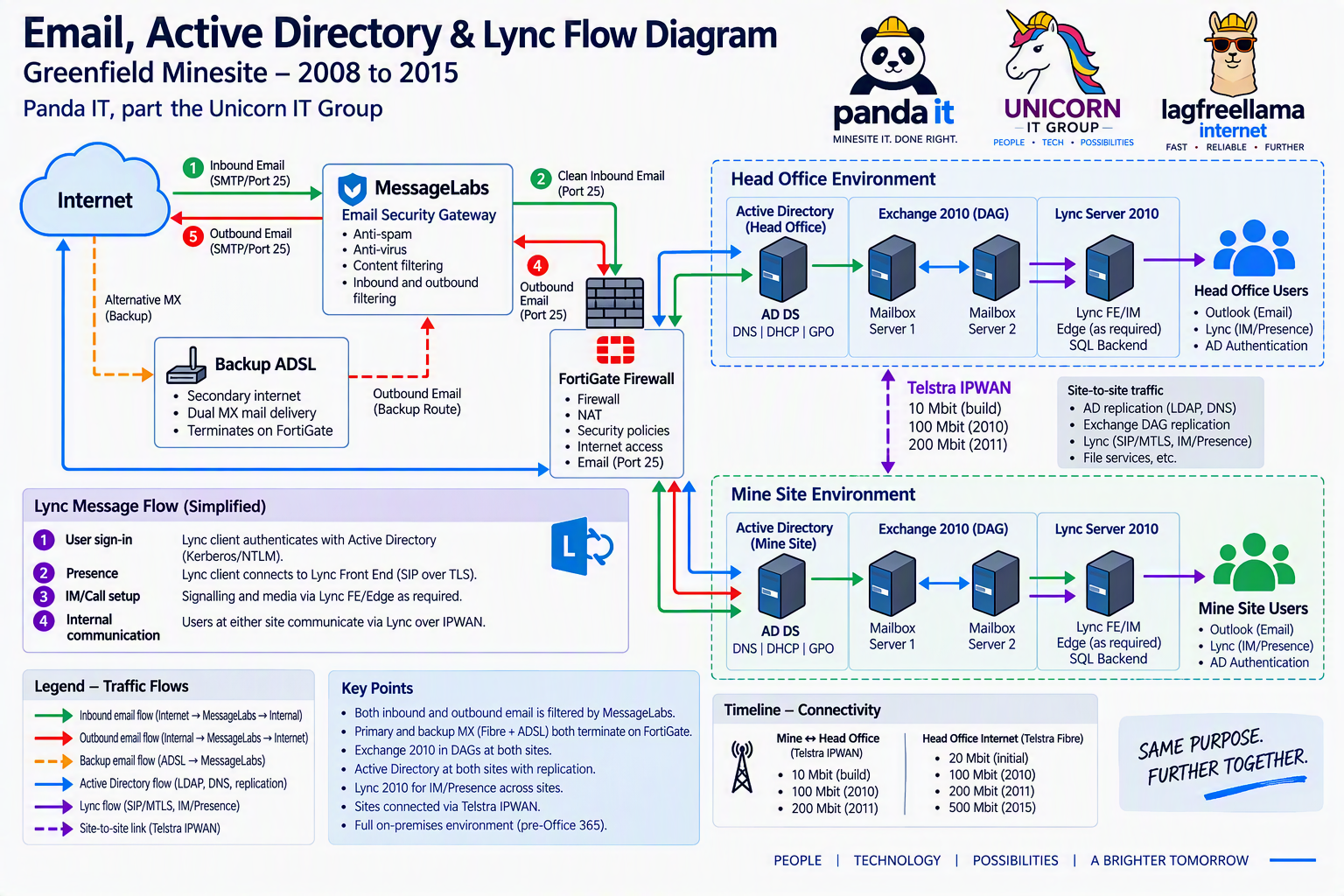
At the heart of the build was a pair of VMware servers at the mine running Active Directory for user accounts and logins, Exchange 2010 for email, Lync Server for instant messaging and presence, and a file server — all on Windows Server 2008 R2. Head office ran the same platform on its own VMware pair, so each site could keep operating on its own if the link between them ever dropped.
The link between the sites
The two sites were joined by a Telstra IPWAN link — 10 Mbit at build, upgraded to 100 Mbit in 2010 and 200 Mbit in 2011 — while head office sat behind 20 Mbit Telstra fibre that grew to 100 Mbit in 2010, 200 Mbit in 2011 and 500 Mbit in 2015. Exchange ran in Database Availability Groups so mailbox databases kept a replicated copy and email could survive a server failure. Inbound mail was filtered through Message Labs before it ever reached the site, and a separate backup ADSL service gave dual MX records, so email still had a path in if the primary link went down — both connections terminated on a FortiGate firewall at head office.
Keeping the data safe
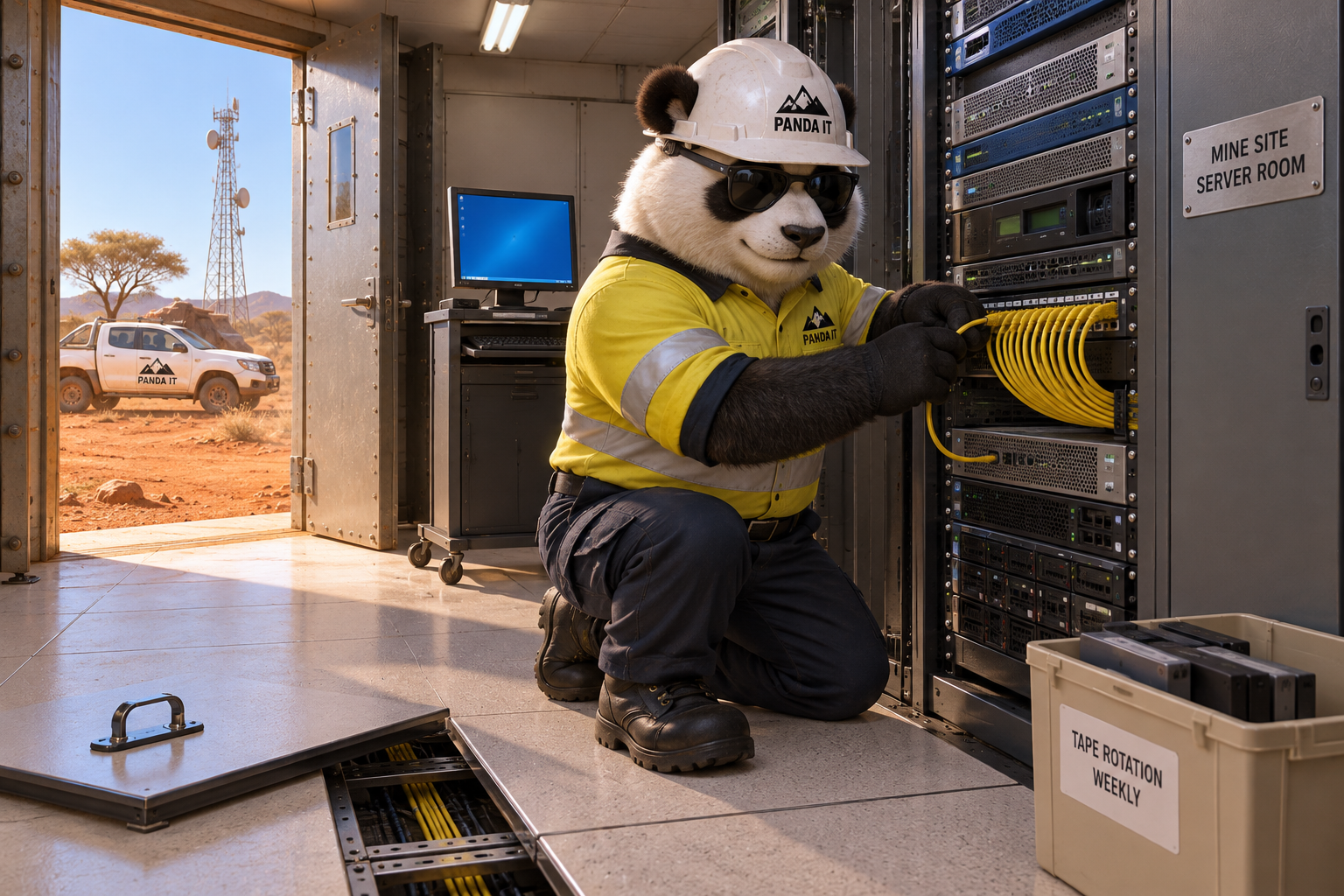
Files replicated back to head office with DFS, keeping a current copy of the mine's data in the office, and everything was backed up on an on-premises Backup Exec server with tapes rotated weekly as part of onsite management. Endpoints ran managed on-premises antivirus — the standard of the day, before MDR and EDR.
Life at the camp
There was no 3G at the mine at the time of build — with an external antenna the site could catch a sniff of reception, and that was it. So the camp got practical communications instead: a phone room with soundproof booths where calls could be taken away from the noise, a 50-handset Asterisk phone system covering the mine and head office, and two wireless access points giving basic internet in the mess and garden area.
Before Instagram, and after
This was before everyone needed to be online 24/7 for Instagram and Facebook, so that was plenty. The build ran from 2008 to 2015, when email moved to a limited Office 365 rollout — seven years of the site running its own IT, reliably, before the cloud caught up.
Email, Active Directory & Lync flow diagram
Key results
- 2008–2015
- in service before Office 365
- 10 to 200 Mbit
- IPWAN link upgrades by 2011
- 20 to 500 Mbit
- head office internet upgrades by 2015
- Weekly
- tape rotation for backups
The challenge
- The mine was brand new, and cloud services like Office 365 didn't exist yet — every service had to run on site.
- The site needed email, instant messaging, file storage and logins that worked the same as head office.
- There was no Starlink and no satellite broadband to fall back on — the only practical path back to head office was a Telstra IPWAN link.
- There was no 3G coverage at the mine at the time of build — with an external antenna the site could catch a sniff of reception, and that was it.
- Endpoint protection meant managed on-premises antivirus: MDR and EDR did not exist yet.
- With a limited link back to head office, files still had to be kept safe and recoverable at the mine.
The solution & results
- Built the full server environment on Windows Server 2008 R2: Active Directory, Exchange 2010, Lync Server and a file server.
- Ran Exchange 2010 in Database Availability Groups (DAGs), so mailbox databases kept a replicated copy.
- Ran the environment on a pair of VMware servers at the mine, with the same setup in place at head office.
- Connected the mine to head office over a 10 Mbit Telstra IPWAN, with head office itself behind 20 Mbit Telstra fibre internet.
- Added a separate backup ADSL internet service at head office for dual MX records, so inbound email had a second path in.
- Terminated both internet services in the office on a FortiGate firewall.
- Filtered email through Message Labs, the managed email filtering service, before mail reached Exchange.
- Upgraded the IPWAN link to 100 Mbit in 2010 and 200 Mbit in 2011 as the site's demands grew.
- Upgraded head office internet from 20 Mbit to 100 Mbit in 2010, 200 Mbit in 2011 and 500 Mbit in 2015.
- Protected the environment with managed on-premises antivirus — the standard of the day, before MDR and EDR.
- Used DFS to replicate files back to head office, with backups running on an on-premises Backup Exec server.
- Rotated tapes weekly as part of onsite management, keeping a recovery copy off the mine's own servers.
- Kept the build in service from 2008 to 2015, when email moved to a limited Office 365 rollout.
- Ran a 50-handset Asterisk phone system across the mine and head office.
- Built a phone room with soundproof booths, so calls could be taken away from site noise.
- Installed two wireless access points for basic internet in the mess and garden area.
- It suited the time: this was before everyone needed to be online 24/7 for Instagram and Facebook, so a basic camp Wi-Fi footprint was enough.
The platform, at a glance
What the mine ran on, and where it ran.
- Virtualisation
- A pair of VMware servers at the mine, with the same setup at head office
- Directory
- Active Directory on Windows Server 2008 R2
- Exchange 2010 in Database Availability Groups (DAGs), until a limited Office 365 rollout in 2015
- Messaging
- Lync Server for instant messaging and calling
- Files
- File server at the mine, replicated back to head office with DFS
- Protection
- Managed on-premises antivirus — before MDR and EDR
- Backup
- On-premises Backup Exec server, tapes rotated weekly
- Link
- Telstra IPWAN: 10 Mbit at build, 100 Mbit from 2010, 200 Mbit from 2011
- Email filtering
- Message Labs filtering inbound email before it reached Exchange
- Internet
- 20 Mbit Telstra fibre at head office, upgraded to 100 Mbit in 2010, 200 Mbit in 2011 and 500 Mbit in 2015, plus a backup ADSL service for dual MX, both on a FortiGate firewall
- Phone system
- A 50-handset Asterisk setup across the mine and head office
- Calls
- A phone room with soundproof booths for taking calls away from site noise
- Camp Wi-Fi
- Two wireless access points giving basic internet in the mess and garden area
- Mobile coverage
- No 3G at build — an external antenna caught a sniff of reception
How the setup changed, 2008 to 2015
The build wasn't a one-off install. The link and the platform grew with the site over seven years:
- 2008
The mine is built out: a pair of VMware servers running Active Directory, Exchange 2010 in DAGs, Lync Server and a file server on Windows Server 2008 R2, joined to head office over a 10 Mbit Telstra IPWAN. Head office runs the same setup behind 20 Mbit Telstra fibre, and a 50-handset Asterisk system covers phones across both sites, backed by a phone room of soundproof booths and two wireless access points in the mess and garden area.
- Steady state
Day to day, Message Labs filters inbound email before it reaches Exchange, a separate backup ADSL service gives dual MX records, and both links terminate on a FortiGate firewall at head office. DFS replicates files back to head office, Backup Exec handles backups with tapes rotated weekly as part of onsite management, and endpoints run managed on-premises antivirus.
- 2010
The IPWAN link to head office is upgraded from 10 Mbit to 100 Mbit, and head office internet moves to 100 Mbit to match.
- 2011
The IPWAN link is upgraded again to 200 Mbit, with head office internet stepping up to 200 Mbit alongside it.
- 2015
Head office internet reaches 500 Mbit, and email moves to a limited Office 365 rollout — closing out seven years of the site running its own Exchange.